Doula Invoice and Insurance Billing Tracker

$15.00

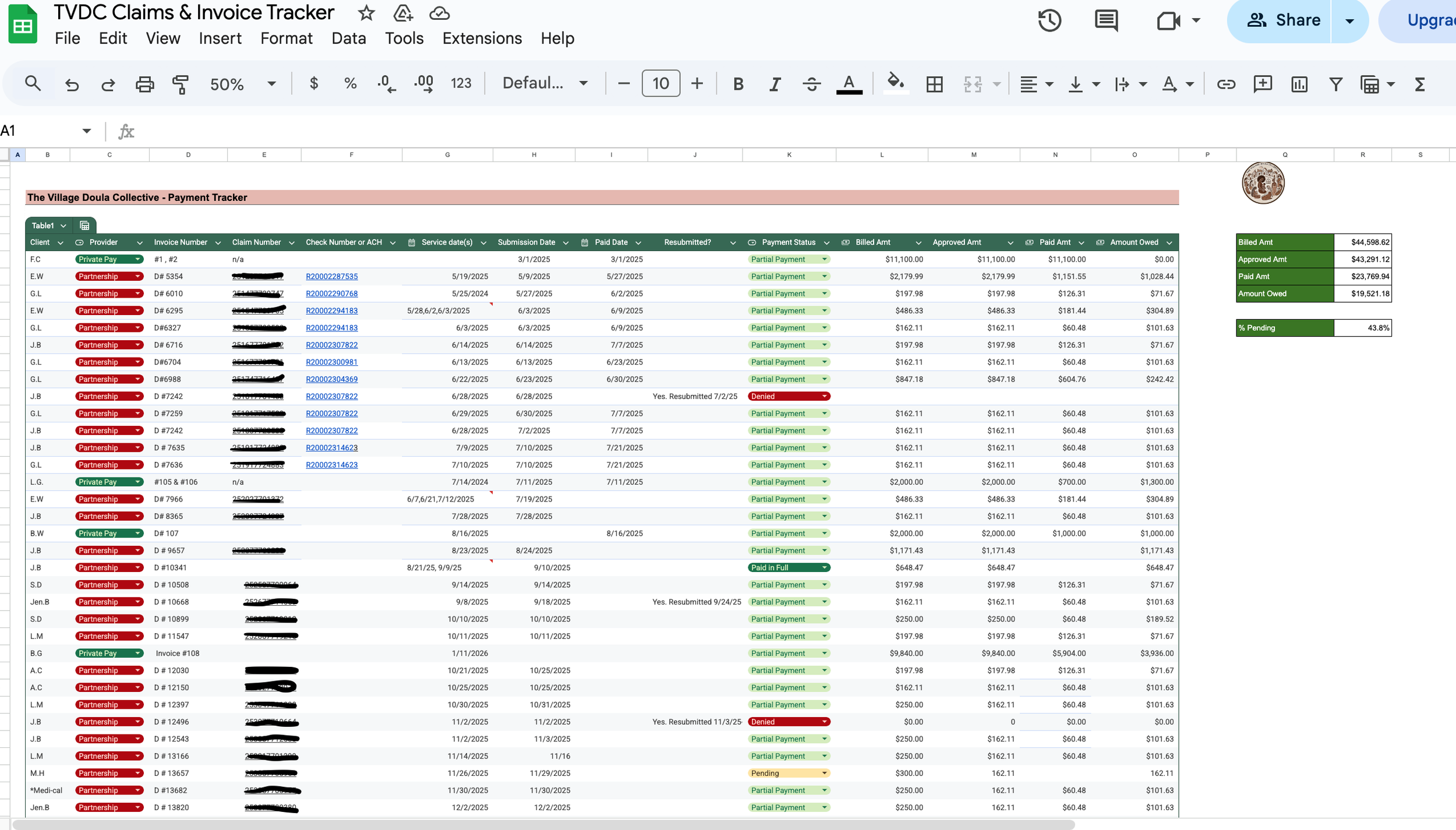
Navigating Medi-Cal billing as a doula often means juggling invoices, claims, follow-ups, and variable reimbursement timelines. This TRI, Invoice & Claim Tracker was created to give doulas a clear, centralized way to track billing activity without complex software or systems.

This Google Sheets–based tool allows you to log services provided, invoice and claim submission dates, claim status, payments received, and applicable Targeted Rate Increases (TRIs). It’s designed to support visibility and organization, especially when working with managed care plans where timelines and communication may vary.

The tracker is intentionally simple, text-based, and customizable, making it easy to adapt to your workflow while maintaining consistent records over time.

Navigating Medi-Cal billing as a doula often means juggling invoices, claims, follow-ups, and variable reimbursement timelines. This TRI, Invoice & Claim Tracker was created to give doulas a clear, centralized way to track billing activity without complex software or systems.

This Google Sheets–based tool allows you to log services provided, invoice and claim submission dates, claim status, payments received, and applicable Targeted Rate Increases (TRIs). It’s designed to support visibility and organization, especially when working with managed care plans where timelines and communication may vary.

The tracker is intentionally simple, text-based, and customizable, making it easy to adapt to your workflow while maintaining consistent records over time.

What’s Included

  • View-only Google Sheets tracker

  • Columns for:

    • Services provided

    • Invoice and claim submission dates

    • Claim status

    • Payments received

    • Outstanding balances

    • Targeted Rate Increase (TRI) notes

  • Step-by-step instructions for making your own copy

How You’ll Receive This Product

After purchase, you’ll download a PDF file containing:

  • A brief overview of the tracker

  • A link to the Google Sheet

  • Instructions for making your own editable copy

You’ll access the sheet by selecting File → Make a Copy and saving it to your Google Drive.

A Google account is required.

Important Notes

  • This tracker is provided for organizational and educational purposes only

  • It does not constitute legal, financial, billing, or credentialing advice

  • Use of this tool does not guarantee reimbursement or claim approval

  • Rates, TRI eligibility, and billing requirements may change over time

Terms of Use

  • For individual use only

  • Not for resale or redistribution

  • Due to the digital nature of this product, all sales are final